Yeah:
Not gonna lie, I’m kinda pissed that I have to learn how to handle these activities 
woe is me etc etc, I’ll get over it
Yeah:
Not gonna lie, I’m kinda pissed that I have to learn how to handle these activities
woe is me etc etc, I’ll get over it
Oh, I missed that!
Yes, irksome. As a data scientist, I sympathize on the “edge cases take up 90% of my time” issue.
Same in Controls for safer critical systems. Most of the code is needed to provide robustness and perform on board diagnostics. Fairly small proportion is actually performing the primary purpose.
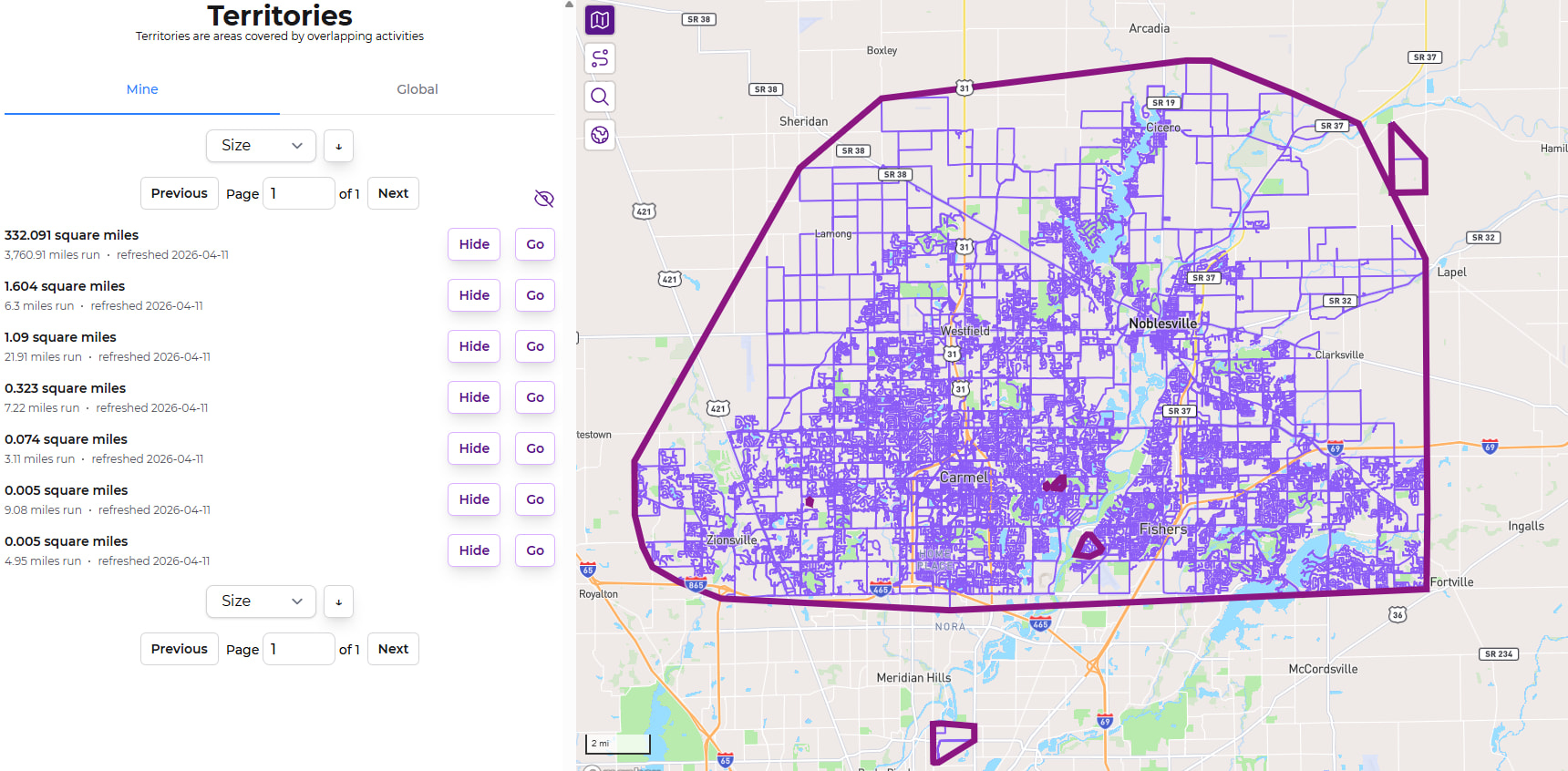
Just took a look at mine and my whopping 7 areas and it looks accurate to me! I have the main blob, 2 tracks, 2 race courses, and 2 runs that I plan to connect. I missed connecting on the intersection of one route just barely.
Edit: it seems the “Hide” button doesn’t actually do anything, but the eye does clear the map.
Oops, thanks - the show/hide buttons will be fixed in the next release.
This is going to be such a cool feature for me, thank you for adding it. Now I can easily see the different towns and villages in our “city” and hopefully one day start connecting some of them!
I do have about five pages of territories though due to isolated parkruns and places visited on holiday, and can’t see a way to easily “show all”. I might just be missing it, but if not that would be a handy tweak 
“Show all” is a generally dangerous feature, since there can be varying amounts of things being shown. Without some limit in some form, it would be very easy to destroy database performance in the perfect storm of a few people requesting ‘all’ of something at the same time.
Overall, though, these lists are difficult to work. The first two are relevant for me, and after that it’s just a collection of stuff that I’ll never join up into the largest territory (states away, or across the country). I could see it being very difficult to navigate a situation where there are ~a dozen nearby territories that could be joined up with some effort … There’s definitely some work to do around making these more identifiable, or more easily viewed in a safe way.
It sounds like Replace England's admin level 6 (and 8 in some cases) with admin level 10 might be relevant in your area. It’s been very difficult to get consensus on some of these areas - some find the larger areas too big, some find the smaller areas too small. More opinions in that thread would be helpful.
Fair enough!
I’m sure you probably have much better ideas but a couple off the top of my head: a “show all in pinned city” button to limit the performance hit, or even just a label on each territory to say which city (or cities, I guess) they’re in and then a way to sort the list by that.
Basically just hoping for a way to view the territories around where I actually live without having to click the show button on literally everything over multiple pages. But this is a new feature and these are just ideas not demands. Thanks for the reply!
omg yes that’s the biggest annoyance I’m had with Territories so far … there’s no identifiable data to know where they are, so it ends up being this list of 
 maybe a “show all in view”, similar to Node Hunter … paired with some interactivity around hovering/clicking on Territory borders to view their stats & get a link to them…
Any way to generate a central coordinate for each territory, and then rank option for the list by distance from home city?
Geometrically that’s quite easy, if James stores the area as a set of coordinates. I think I’d find it useful to see all areas within the current map viewable area, which I think is also relatively easy to compute if the current viewable area is expressed as a set of coordinates too.
Yeah, the query is super simple & seems fairly performant. The trouble I have had to overcome is that I’ve built out a standardized set of code that’s used in every search/sort interaction throughout the site, and the syntax of this sorting doesn’t didn’t match.
While writing up a description of why it was going to be difficult, I kept “what if”-ing myself & worked out a solution.
(This is called “nerd sniping” and I’d appreciate it if you didn’t do it to me too frequently  )
)
So the next release (out now) will include a “From Home” sorting that will sort the list of Territories based on their distance from our default city. This listing will not be present on the global list, due to laziness.  Deal with it.
I love the “From Home” feature - and have learned that China and Italy are about the same distance from Seattle.
One small bug: When I go to the second page of territories, it switches from “from home” to “size”. same problem happens with “distance”. It switches to “size” when I go to second page.
From Home works well but I think the default is set to the furthest away? Would be more intuitive if the default was closest, just my opinion.
And this! Impossible to get to anything other than page 1
This has been so fun to explore. My largest territory is of course my “home base”, with zillions of runs. But my second-largest is a single run – the Providence Marathon.
Oops! I wasn’t retaining the sorting in pagination.  The next release will fix that up.
Update: All fixed.
This is a weird quirk to how I built pagination everywhere throughout the site. The sort field, the sort direction, the specific page entry, and the previous/next buttons are all individual/isolated interactions. They’re each wired up individually to send all the current state (so clicking the next button also sends over the sort field/direction).
There’s a default sort field and sort order every time. In the case of Territories, it’s size descending.
So when switching the field to sort by, it’s sending off the current sort direction as well. If you were to change to ascending first, then select “From Home” then you’d have closest first.
I think I’d have to join the two fields into one, and double up each entry from e.g. just “Size” to “Size Ascending” & “Size Descending”.
Ah, I learned that this is the “Gaps and Islands” problem. Some version of what’s discussed in https://gis.stackexchange.com/questions/420583/gaps-and-islands-problem-in-postgis-for-gps-traces will probably allow me to process these types of activities as they sync in, splitting them off into multiple activities. I’ll also need to figure out how to find & split all the existing activities that are like this.
This will be a great improvement to things, if I can figure it out. I think it’ll help out everyone with all those long straight lines on their LifeMap.
Yes, that’s a pain! We are a couple of striders who have completed Stockholm now. A while back I noticed a friend suddenly had one incomplete street after an update, but I was still at 100%. So checking this I found a new street added, but one of my long straight lines happened to pass right across this new street, so it was wrongly credited to me. (Of course I had to go back there and run it for real)
Would it be possible to provide a different color for activities that make up a territory, even if it is limited to territories that only have a small number of activities?
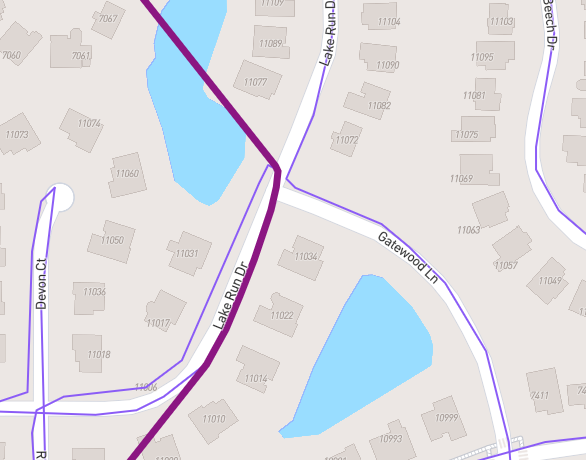
When sorting by “from home”, I noticed there were a number of small areas that were “enclaves” fully contained in my main local area. I need to zoom in closely to see that I happened to be on different sides of the street for different activities. It can be hard to identify what activites are part of this territory vs. those that are included in the area but part of the greater territory.