Profile: Mark Bolger - CityStrides
Route: 260628 - 36th to 40th, West Side - CityStrides
Issue: The curve on the dogleg on the southern-most portion of this route, nearest to the water, contains a node that can’t be reached because it is on private property. The straight extension from 40th St is public; however, the dogleg curve in the dogleg is private.
Request: Reposition the node before the curve on the dogleg on your map. The straight extension from 40th St is public; however, the dogleg curve in the dogleg is private.
The route you linked isn’t public, so we can’t see it. You can either edit the route & check the box to make it public, or you can share other links to the city & streets.
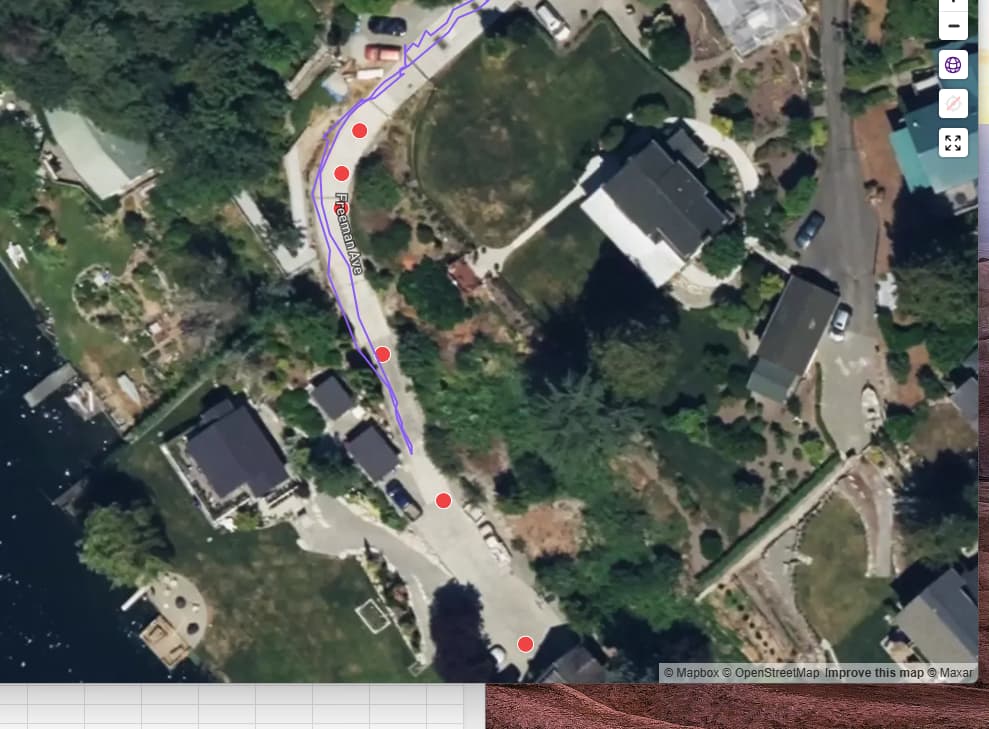
Actually, a tip is that giving a link to a route is not the best way. You should instead give us the street name and the link to the street itself, and indicate which nodes are inaccessible. Anyway, I found your run on Freeman Ave, so what needs to be done is not moving nodes, it’s setting the last part of the street as private. So just to make clear, should the last two nodes be private in this screen shot?
Thank you, and apologies for the delayed response. Next time I will give you street name and the link to the street itself, and indicate which nodes are inaccessible.
As for Freeman Ave, now that we are looking at a photo, I would suggest removing the last three nodes because you can see where the city’s roadwork ends.
Ok, fixed that in OSM. This, and the other change, are done in OSM. They won’t be visible in CS until a sync has been done. Those are normally done every 4-6 weeks, but I see that Mercer Island hasn’t been synced since May 9. You can trigger a sync manually from the city page, I tried that now, but there seems to be some heavy load on the site right now, so it doesn’t. I can try again later
 My profile link :