I’ve got it re-enabled again … Its performance seemed ok … let me know how it works for you.
Love where this idea is going. I have always mentally gotten burned out and exhausted when trying to create efficient routes.
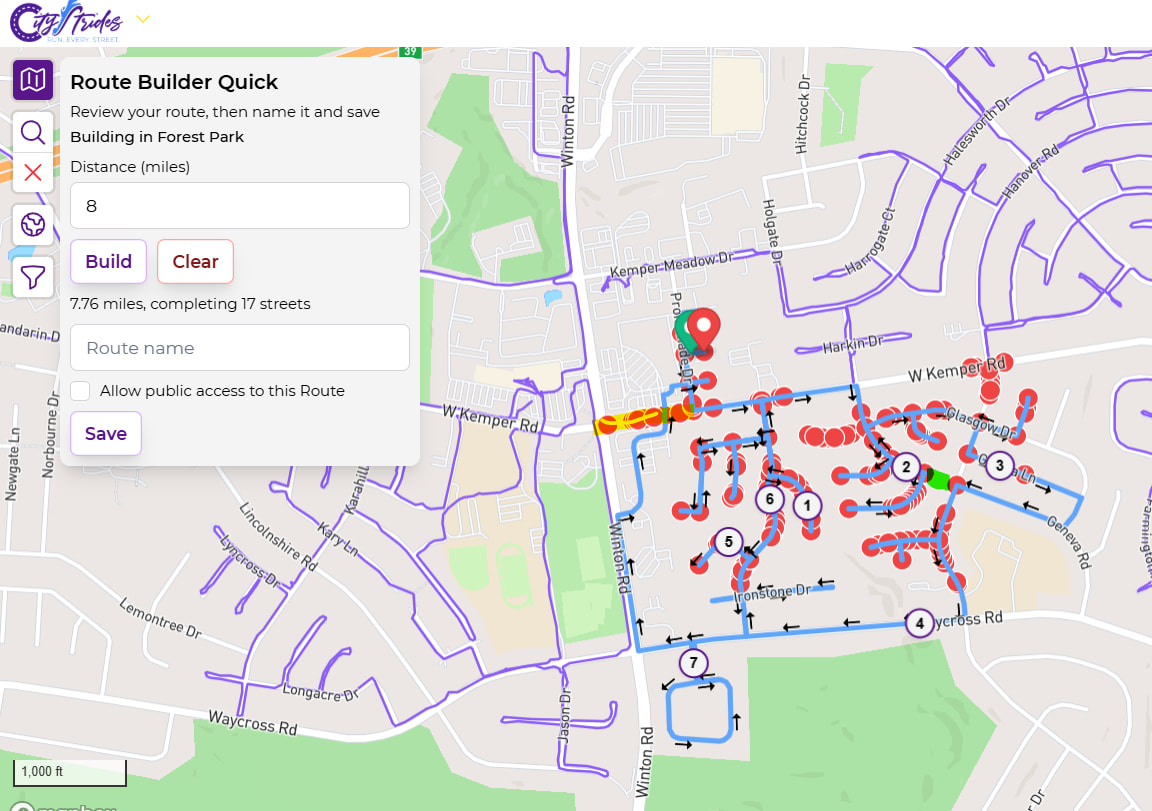
Just created my first attempt on the new tool. One thing that instantly popped up to me is that near the start, the route chose to cut through parking lots at a shopping center instead of staying on the street. Which means nodes were skipped and never came back for. (highlighted in yellow on the screenshot). There was also a spot near mile 2 where the route didn’t finish off a street, which no nodes were omitted in doing so, but if one gets added there in the future then I’d lose the street. (highlighted in green).
Thanks for creating and maintaining this new feature. Looking forward to using it.
Its focus is to complete as many streets as possible within this route, so it likely skipped W Kemper Rd as out of scope - that looks like a pretty long street.
That green section was likely skipped due to the eastern side of Geneva Rd also not being complete - for the same reason of optimizing for completed streets within this route.
I cannot provide routes that complete nodes/streets that only exist in the future. 
1 Like
This feature is absolutely amazing. Thank you so much for building it!
Since you are able to code a starting and ending point that the path is forced to touch, I wonder if it would difficult (for you, or the algorithm) to add one or more waypoints that are similarly required. That way users could add “pseudonodes” that are not present in OSM, to ensure traveling a particular street and not just hit every node.
Just an idea within an idea! 
2 Likes
Is the goal of the tool to maximize streets completed or nodes? Some nuance to what I’m asking but a difference nonetheless.
1 Like
It’s trying to complete as many streets as possible within the given distance.
That idea is probably worth its own post in Ideas
1 Like
I just discovered this feature. I’m trying it but it’s just spinning and not doing anything so I can’t see how it works 
It asks for a start and end point and a distance. Is that the distance above the straight line distance? I can’t imagine what else it could be. For example, if it’s 5km from start to finish and I enter a distance of 3km, will it do an 8km route? It obviously can’t do a 3km route because it won’t reach the end.
I think the expected use is basically double-clicking to drop start/end points at the same location then setting the distance to have it generate a route that’ll go out & complete as many streets & bring you back.
If you drop two points that are 5 miles away from each other & set the distance to 5 miles, it’s not going to be able to do anything for you.
The distance entered is the maximum distance. In my experience, it regularly comes in under - sometimes half. If I don’t like it, I just click the Build button again … and again … and again … until I like it.
I think the reason it was just spinning was because I gave it an impossible task!
This seems a bit inconvenient - I first need to calculate the direct route distance myself and then add a bit to it and enter that number. You could do that and then add the number I enter. That would also work if start and end are the same.
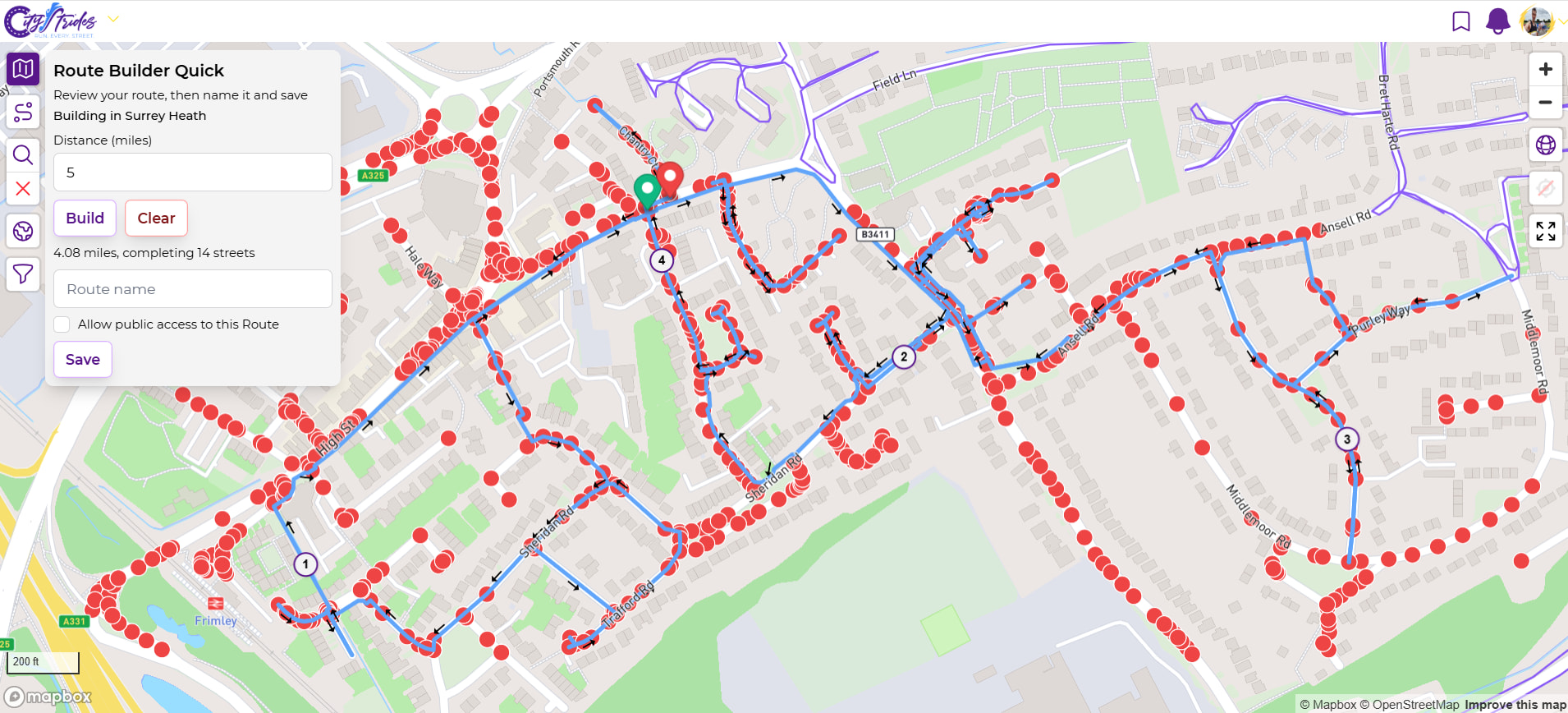
Good to see this feature. I tried it on a few locations where am on the edge of what I have done and what have not in a particular city. I found the routing more geared to getting about than completing streets however. So take this example - I asked it for 5 miles at more or less the same location for start and finish (e.g. where I might park) but has taken me on a somewhat unstructured meander and left nodes that I would then have a tricky follow up run. What I try and do is target a bounded area and fill everything inside it so next time here I can just along a bit as it were.
2 Likes
There’s a list of new Route Builder “modes” in Automatically Generate Routes - #25 by JamesChevalier and this is “Right Now Mode” … it’s aiming to complete as many streets within this run, without any care of overall city progress.
The mode you’re waiting for is “Finish Area Mode”. This is not that.
There’s also an amount of  “jitteriness” where it’s going to give you different routes if you click the Build button a few times. So, it’s kinda designed to not be perfect and instead to be fun - it’s pretty fast, comes close to your maximum distance, and completes a bunch of streets. It gets you out the door to run, it’s not concerned with efficiency.
To that end, I find it’s a great way to explore new cities while traveling.
4 Likes
Ok the Finish Area Mode one is what I often create “manually” and upload to my Garmin Forerunner as a course from the exported CSV. I use that if want to have a good idea of how far/long I am going to be running for and also can just follow the route on my watch without having to keep pulling my phone out to check where I am and/or are going. So that would be very useful to me in CS terms. Otherwise don’t see a use case for me in Right Now Mode as these days if I am running streets I try not to leave odd ones behind as it were.
2 Likes
James this is all great stuff.
However i would say the feature that would make any of these modes more useful is an ability to tweak the routing of any generated route, no matter how it was created. Perhaps this exists but I have not found it in your route builder.
I find this to be a gap even when I manually create my own route - and then realize after saving it that i missed a node/street somewhere. There does not seem to be a way to go back and insert a new ‘waypoint’ along the route to hit, say, a street that i missed in the initial route build.
I am admittedly a fairly new user/subscriber so I may be missing a feature somewhere that does this? But Garmin/Strava/etc all have that type of ‘route edit’ feature.
That’s worth its own post in Ideas … apologies for the hassle of creating a new post, but it’s the only way I can keep up.
I tend to release things early - once they’re usable (for various definitions ) - and I do my best to keep up with great ideas like this that can improve things once they’re out there.
The Route Builder that’s embedded into every map does allow you to edit things as you go. You can also edit it after you click the Save button - each subsequent click on the Save button updates the saved route (it does not save additional routes each time you click Save).
Personally, I find route editing to be effectively impossible on mobile - it does an awful job of picking up tap/drag, and I just end up placing new markers. That’s a whole other conversation, though.
I’ll be happy to post that in ideas.
Maybe i’m just thick, but the only change I am able to make after I save a route is the name of the route. I dont see a way to change any waypoints or routing paths. Is this just a matter of #RTFM?
In case there’s confusion - I’m talking about the embedded Route Builder that’s present on every map, not the dedicated Route Builder page. Here’s a quick recording of how you can save a Route as you go, using the embedded Route Builder:
2 Likes
Yes I was confused. I can edit a route while in the viewer - however once the route is saved I cannot alter it.
Here’s how i open the route: If open “Routes” from the upper right corner menu (clicking on my icon), and select either “Show” or “Go” on a route, I cannot edit any points of that route - there is just a ‘hand’ icon which moves the map around but does not allow editing of the points.
If i select “edit” of that route i can only change its name. Is that a bug?
Yes, I’m confused as well! If I create a Route as in Jim’s example, and save, and stay in the same window, I can drag the route to change it. But if I have saved it, then go back to it with the Route option in top right menu, and choose edit, I can only change the name, not the routing itself. I get this when I click Edit
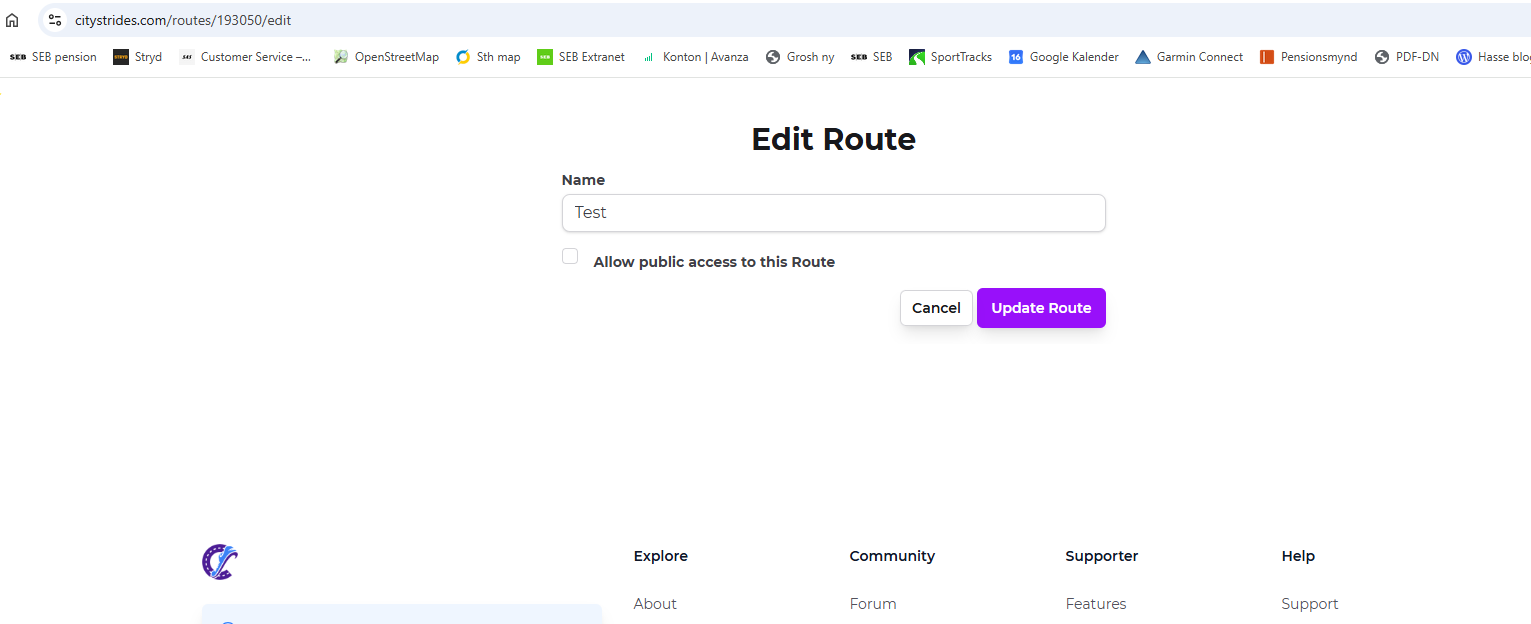
You can’t edit a route that’s already been saved once the builder is closed. You can edit a route that’s already been saved if you are still actively in the editor, as per James’s example. Thereafter, all you can do is change its name.
James it could help eliminate some confusion if instead of saying “edit route” the button said “rename” or “rename route”, to clarify that this will not be to modify the gpx track.
7 Likes