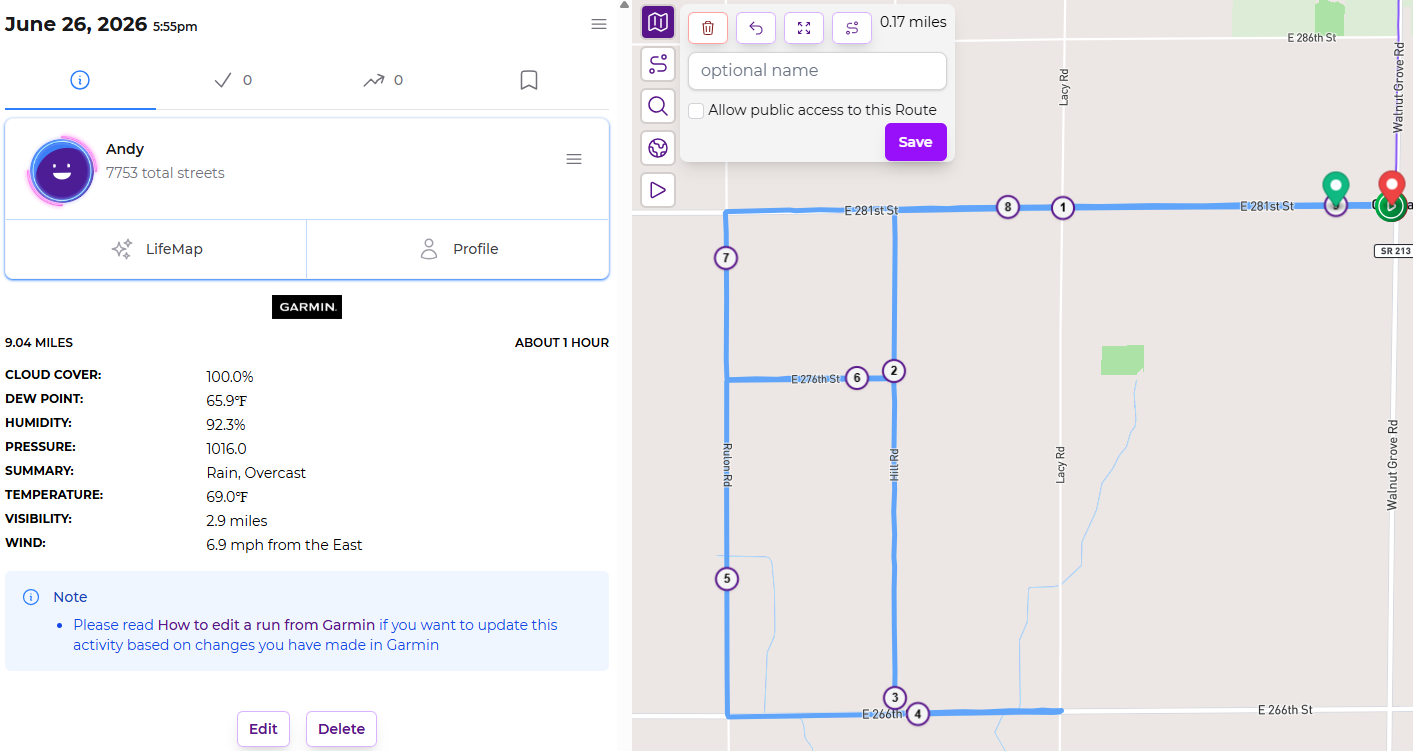
I was looking at a recent run and noticed that the mile markers in the activity did not line up with the route as I expected. These are pretty straightforward rural roads so they’re all 0.5, 1, or 1.5 mile stretches. The route finished at 9.04 miles (for whatever reason), but the mile markers in the activity view show it as 9.17 miles. Using the route builder I get very close to 9 miles.
Is this some sort of quirk with how the GPS data works or is the site just misplacing the mile markers?
As a runner in Boston, my mind is boggling at perfectly straight roads in increments of exactly 0.5 miles.
I checked your route on onthegomap.com, and verified that your route was indeed very, very close to 9.0 miles. I then check my most recent run, that happened to be 5.0 miles, and the 5-mile marker is well short of the end of the run.
So, it does seem to be a minor marker placement issue.
For me, Garmin is the “ground truth” recording device. The final recorded data point of the FIT file reports a total distance of 5.0039 miles. Sadly, I cannot find a way to make Garmin Connect indicate mile markers on the map.
When I look at my Runkeeper account for that activity, the total distance is reported as 5.0 miles (and it is 5.0mi in CityStrides, too). I suspect RK is pulling the total distance directly from Garmin. But there is a 5-mile marker well before the end of the run … about 0.12 miles before. I suspect that Runkeeper is calculating those from the GPS data points themselves, since Garmin does not report those (I assume).
Another factoid is that I notice that Runkeeper has the little “pause” symbols on the map. This activity is now long enough ago that I can’t remember when/why/if I paused. Could have something to do with this, I suppose.
@JamesChevalier, does CityStrides calculate the mile markers itself, or pull them from Runkeeper? (I have both Garmin and RK connected to my account, because my use of RK predates my use of Garmin).
Reminds me of the saying, “He who has one clock knows what time it is. He who has two clocks is never quite sure.”
I went down the rabbit hole a bit. I did some vibe coding to apply Turf’s along() code to my FIT file. I was able to replicate the mile markers at the positions that you and Runkeeper report, via calculating the cumulative distance at each recorded GPS point.
But Garmin also reports its own (cumulative) Distance field, and it is consistently a bit shorter than the GPS-derived geodesic distance. (For this one file, it is 1.5% shorter.) I suspect that Garmin is applying some kind of smoothing function to the geodesic points, to remove the spurious GPS jitter. This will systematically shorten the distance.
For Garmin activities, I expect you would get more accurate mile markers if you used Garmin’s Distance field directly. But, in the greater scheme of things, this 1.5% difference strikes me as pretty low priority.
Interesting! Yeah, probably a smoothing technique. Unfortunately, due to their hostile “one request only” limit on accessing data, I can’t get this info for activities already in CityStrides. I probably won’t spend time on this because of everything else (city sync processing ) I have going on.


 ) I have going on.