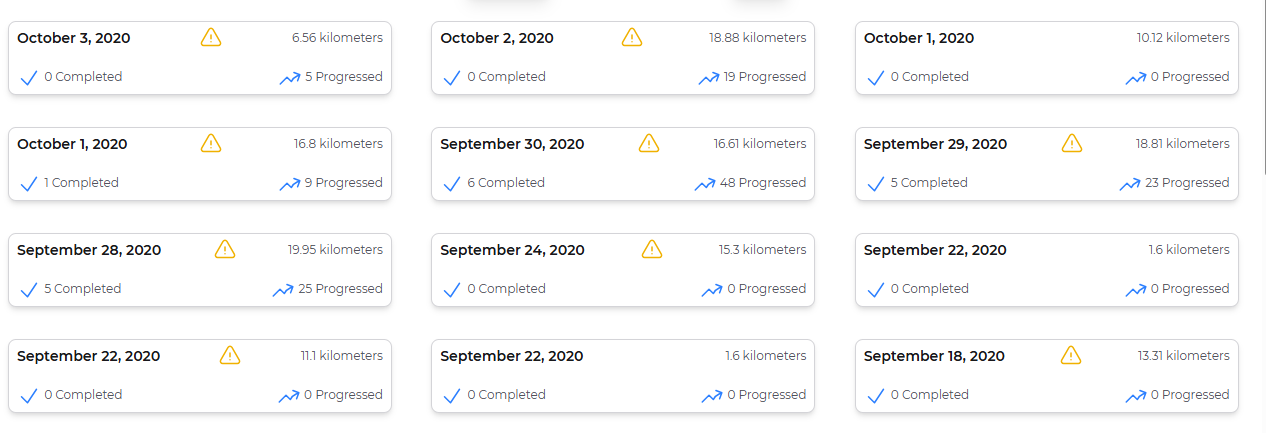
I think I found a solution for my issue. Some of my workouts show this message:
Activity Exceeds Limits
This activity is faster than 15mph. In the future, activities that are too fast will not be present in CityStrides.
Somehow, they have a duration of less than a minute. No idea why, in my device the duration is correct. Can I use the Resync button in order to correct this?
I found out that this seems to be a bigger problem for my older tracking data (before 2021).
Nearly all of them are marked as too fast because of a duration of less than one minute. However, some of them have a correct duration, even though all of them were tracked with the same device.
Any idea what the problem could be and/or how to solve this?
Plus: What exactly are the consequences of this? It seems as if the completed streets from these workouts are still counted as complete - except for the ones from my initial post.
This is more common with MapMyFitness. I did recently change where I get the duration value from (they have two for some wild reason). Hopefully that clears it up.
Please try to resync some of these to see if that resolves the issue. Let me know what you find.
If a few of them resync ok, let me know and I can run some code to batch fix them - so you don’t have to do it all manually.
Ultimately, these are being removed from CityStrides. Everything over 15mph - I have these blocked from new syncs and very slow code running now to remove existing matches.
I tried to resync one activity some hours ago - and it’s been gone ever since.
Maybe because my connection to MapMyFitness isn’t active anymore? I switched to Suunto conenction some time ago.
I manually synced that activity via “Sync Single Suunto Activity” and that worked.
I guess “Resume Syncing” from Mapmyfitness won’t be a good idea, as it would import all the workouts that have already been added by Suunto for a second time, right?
Yeah, if you have your MapMyFitness connection paused, nothing is going to sync in through that service (I think single activity sync requests go through). It may also require you to log into CityStrides again via MapMyFitness to revive it. Whether or not that’s necessary, we’ll figure out below…
There is de-duplication in syncing, but I’ll have different recommendations based on different data situations.
Is all your MapMyFitness data in Suunto?
If not all activities, then are all of these duration issue activities present in Suunto?
If not all of these duration issue activities, then are they fixed in MapMyFitness?
OK, I’ll need you to log into CityStrides via MapMyFitness again to revive that connection.
Let me know when you’ve done that.
If you’re not already logged into the MapMyFitness site, then it’s probably easiest to do all that in a private browser window - you don’t need to keep anything open after logging in, just that action will fix it up
If you’re already logged into the MapMyFitness site, then it might be easier to log out of CityStrides and then log back in via MapMyFitness.
After that’s done, I’m going to grab one of your problem activities & check its duration through their API - I recently swapped out which of the two values I use, so I want to see if that value is present.
If it is, I’ll be able to write some code to go through all these & fix them up.
Since they’re showing a good duration on their page, I’d guess that the data is present/available.